
Redhaze Network
  • 0 Shopping Cart
  • Home
  • Store
    • Browse All
    • Shared Hosting
    • Wordpress Hosting
    • Business Shared Hosting
    • Reseller Shared Hosting
    • Site Builder
    • Website Builder
    • SocialBee
    • Register a New Domain
    • Transfer Domains to Us
  • Announcements
  • Knowledgebase
  • Network Status
  • Contact Us
  • More
  • Account
    • Login
    • Forgot Password?
  1. Portal Home
  2. Knowledgebase
  3. Domain Management
  4. How to Remove Parked Domain name in cpanel?

  Categories

Backup/Restore
4
cPanel - Control Panel
24
Databases
11
DNS - Nameserver
6
Domain Management
10
Email
11
FTP
9
Installing a Control Panel
6
Mail Filters & SPAM
8
Mobile
11
Others
3
Security
10
SiteWorx (Control Panel)
60
Softaculous
79
SolusVM
19
SSL
5
Wordpress
17

  Categories

  Support

My Support Tickets
Announcements
Knowledgebase
Downloads
Network Status
Open Ticket

How to Remove Parked Domain name in cpanel? Print

  • 0

1. Log into your cpanel account.
2. In the "Domains" section, click on "Parked Domains" Icon.
 

3. Under "Remove Aliases", locate the parked domain name and. "Remove" link.
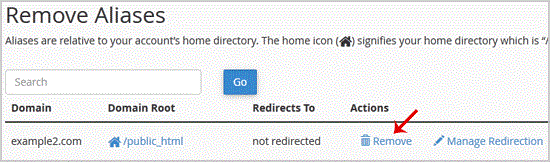


. For confirmation you will need to. "Remove Alias" babies once more.

You should see a success message that your Parked/Alias Domain is removed.


Was this answer helpful?

Related Articles

How to Create a Subdomain in cpanel? 1. Log into your cpanel account.2. In the "Domains" section, click on "Subdomains" Icon. 3. Under... How to Remove an Add-on Domain? 1. Log into your cpanel account.2. In the "Domains" section,. "Addon Domains" icon.3. Locate the... How to Remove a Subdomain in cpanel? 1. Log into your cpanel account.2. In the "Domains" section, click on "Subdomains" Icon. 3.... How to Park a Domain in cpanel? Note: Before parking a domain, First you need to update name server of your domain you want to... How to Redirect an Add-on Domain? You can redirect your add-on domain to another domain.1. Log into your cpanel account.2. In the...
« Back

Powered by WHMCompleteSolution

  Support

My Support Tickets
Announcements
Knowledgebase
Downloads
Network Status
Open Ticket
  • Contact Us

Copyright © 2026 Redhaze Network. All Rights Reserved.


Loading...
Loading...
Choose language
العربية
Azerbaijani
Català
中文
Hrvatski
Čeština
Dansk
Nederlands
English
Estonian
Persian
Français
Deutsch
עברית
Magyar
Italiano
Macedonian
Norwegian
Português
Português
Română
Русский
Español
Svenska
Türkçe
Українська

Choose Currency

RM MYR
$ USD

Generate Password

Please enter a number between 8 and 64 for the password length